Reverse-engineering Samsung Notes handwriting
Contents
I'd been moving off Samsung Notes and wanted to take my handwritten notes with me, except there's no real way to get them out. You can export a page as an image or a PDF, but that's a flat picture, the actual strokes stay locked in the app. The file Samsung Notes saves, .sdocx, is a ZIP, but everything inside is an undocumented binary format. I started on it in October 2025, and my decoder and a small renderer for it are on GitHub. Almost all the work went into one piece of it, how a single pen stroke is stored. That's also where the other tool that reads this format gets the encoding wrong.
It also turned out I wasn't the only one trying to get into these files. While the repo was still private, someone building a pen-plotter rig wrote to me for access. He wanted to take the handwriting trapped in his own Samsung Notes and have a machine draw it back out, in ink, on real paper. I gave it to him, and he contributed a converter that turns the decoded strokes into G-code, the instruction language CNC machines and 3D printers run on: move here, drop the pen, trace this line, lift. It even sorts the strokes back into the order you'd write them, row by row and left to right, and tunes the pen lifts, so the plotter fills the page the way a hand would instead of in whatever order the file happened to store them.
A machine drawing your own handwriting back onto paper is the kind of thing nobody had done with these notes before, and it only happened because one person could finally read the file. Your notes should be yours: not a flat picture the app hands you, not data that a single company holds the only key to. Once a file can be read, it becomes things no one planned for, and that is what I keep building toward.
Who else has looked at this
Only one earlier effort touches this file: a script from 2021 that unzips it and pulls the typed text out of note.note. It doesn't touch the handwriting. As far as I can tell, nobody had decoded the on-disk stroke geometry when I started in October 2025.
Two other efforts came after. In January 2026 TimGmbH went at it from the runtime side, hooking the Windows app with Frida and reading the point arrays out of memory while a note is open (his comment); those are the points the app has already decoded, not the raw bytes on disk, though he'd independently found that strokes are stored as deltas. Then in March 2026 came twangodev/sdocx, a Rust library that reads the on-disk format directly. It's the most complete reader of the format and the one I compare against through the rest of this post, but it gets the underlying delta format wrong, so some strokes come out distorted.
The file
Inside the ZIP you get a note.note with metadata, a pageIdInfo.dat listing the pages, one .page file per page, and a media folder. The strokes are in the .page files, which are binary and just as undocumented as everything else.
To work out the .page layout I decompiled the Samsung Notes app. It's an Android APK, so the code is Java, and jadx turns it back into readable classes, though the build is obfuscated and every class and method comes out as a single letter. The way in was to find where the app opens a .page file and follow the calls from there, into a chain of readers: a page reads its layers, a layer reads its objects, and each object reads itself out of a header, with pen strokes handled by a stroke subclass of that object. The names are meaningless and specific to this build, but the read methods give the byte layout directly:
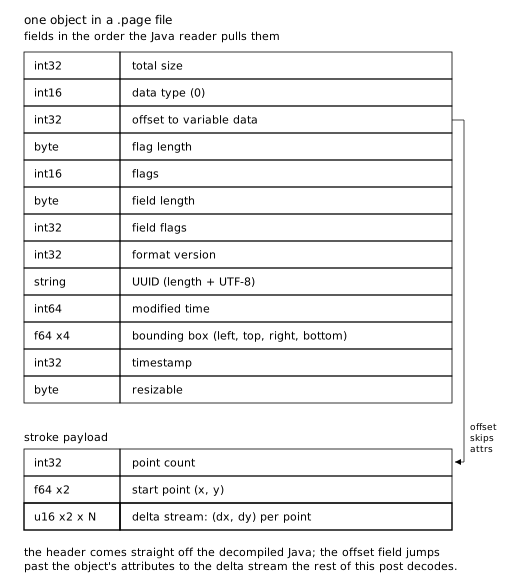
Most of the header still reads as named fields even with the symbols stripped, because the class carries a debug dump that pairs each field with a string. One of those fields is a rectangle: four doubles read in order into an Android RectF as left, top, right, bottom, and the dump labels it "rect". So every stroke stores its own bounding box right next to its points. I skipped past it while I was after the geometry and came back to it later, because it turns out to be a way to check the decode.
The Java stops at that header. The stroke object keeps the delta stream after it as a raw byte buffer and never turns it into points; at runtime the app hands those bytes across the JNI boundary (the bridge from Java into the app's bundled C++ libraries) to the SPen native library. So the container was solved but the geometry was still a wall of 16-bit words, each one a delta nudging the pen from the last point. I spent a while trying to guess how a word becomes a distance straight from the bytes, mostly handing it to Claude to try strides and scale factors, but nothing lined up with the bounding box.
Reading Samsung's own decoder
The geometry is decoded in native code, not Java. libSPenModel.so, pulled from lib/arm64-v8a/ in the APK, is the SPen SDK's model library, and it kept its C++ symbol names. The exported function that turns a stroke's bytes into points is SPen::. Its demangled signature reads a byte cursor and fills a tuple of output vectors:
SPen::ObjectStrokeBinaryHandler::sm_RestoreStroke(
    // byte cursor, walked forward as it reads
    unsigned char **cursor,
    // number of points to read
    int count,
    // outputs: the points, then the per-point channels
    // (pressure, tilt, ...)
    std::tuple<std::vector<SPen::PointF>,
               std::vector<float>,
               std::vector<int>,
               std::vector<float>,
               std::vector<float>> &out,
    // flags: which extra channels are present
    int, bool, bool)
Inside the library this is only referenced through its own export thunk (the stub that outside binaries call it through), so the caller is the app on the far side of the JNI boundary, not anything in the library itself. That's why nothing in the decompiled Java decodes the words: it reads the header and hands the rest to this. I decompiled the body in IDA.
It allocates a buffer per channel, copies the delta words out of the cursor, then runs one loop per point. The decode happens inline in that loop, written in ARM NEON intrinsics (NEON is ARM's SIMD: the names below are functions for vector math, and packing the X and Y words into one register lets the same call decode both at once). The decompiler's variable names carry over: v13 is the buffer of coordinate words, v14 the pressure words, v52 the output point being written, v47 the point index, and v68 the point count. Here is the core of the loop, with the bounds checks cut:
do {
    // x, y -> the two lanes of v57, then pressure
    v56 = &v13[4 * v47];
    v57.n64_u32[0] = *(unsigned __int16 *)v56;
    v57.n64_u32[1] = *((unsigned __int16 *)v56 + 1);
    v58 = v14[v47];

    // coordinate magnitude, both lanes at once:
    //   (w & 0x1F)/32  +  (w >> 5), sign bit cleared
    v59 = vadd_f32(
        vmul_f32(
            vcvt_f32_s32(vand_s8(v57, 0x1F0000001FLL)),
            (float32x2_t)0x3D0000003D000000LL),
        vcvt_f32_s32(vshr_n_u32(v57, 5) & 0xFFFFFBFFLL));

    // apply sign (bit 15), add onto previous point
    v61 = vadd_f32(
        v52[-1],
        vbsl_s8(
            vcltz_s32(vshr_n_s32(vshl_n_s32(v57, 16), 16)),
            vneg_f32(v59), v59));

    // pressure: a different split, 3 int + 12 frac
    v60 = vcvts_n_f32_s32(v58 & 0xFFF, 12)
        + (float)((v58 >> 12) & 7);

    // ...store the point, accumulate pressure...
    ++v47;
} while ( v68 != v47 );
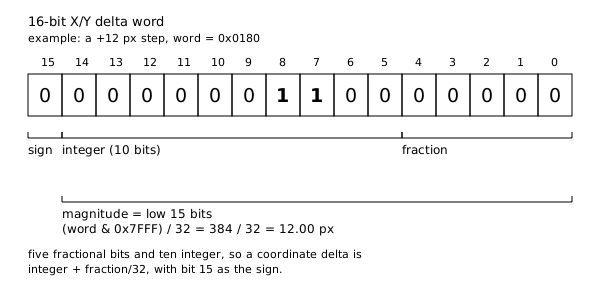
Reading it a step at a time. v57 holds the X word in one half of the register and the Y word in the other, so each call below works on both. vand_s8(v57, 0x1F) keeps the low five bits of each word, and vmul_f32 multiplies them by 0x3D000000, which is the float bit pattern for 1/32; that is the fractional part, five bits over thirty-two. vshr_n_u32(v57, 5) shifts those five bits off to leave the integer part, and the mask 0xFFFFFBFF clears one bit, bit 10, which is where the sign ends up after the shift. Add the fraction and the integer and the magnitude is (word & 0x7FFF) / 32: five fractional bits, ten integer. The sign itself is bit 15, pulled out by sign-extending the low sixteen bits (vshl left by 16, then vshr back) and testing for negative; vbsl then selects -d or +d. That delta is added onto the previous point, v52[-1], which is what makes the words deltas rather than absolute positions.
The pressure word v58, on the next line, decodes on a different split: (v58 & 0xFFF) / 4096 + ((v58 >> 12) & 7), twelve fractional bits and three integer. So two fixed-point layouts sit a few lines apart in the same loop, and they are not interchangeable. Run the coordinates through the pressure split by mistake and they come out 128x too small, which is roughly what my early byte-guessing was producing.
Checking it against the box
That rectangle from the header is the check. It's the box around the stroke's original points, stored in the same object as the deltas but written from a separate measurement, so a faithful decode should land inside it on its own. When I decode a stroke I shift it so its top-left corner sits on the box, but I never stretch it to fill the box, so its size comes only from the decoded deltas. I never line the two up, so a stroke filling its box actually means the decode is right.
Each stroke below sits in its own box at true scale, so a short stroke looks small inside a big one. What matters is whether it spills outside the box or stops short.
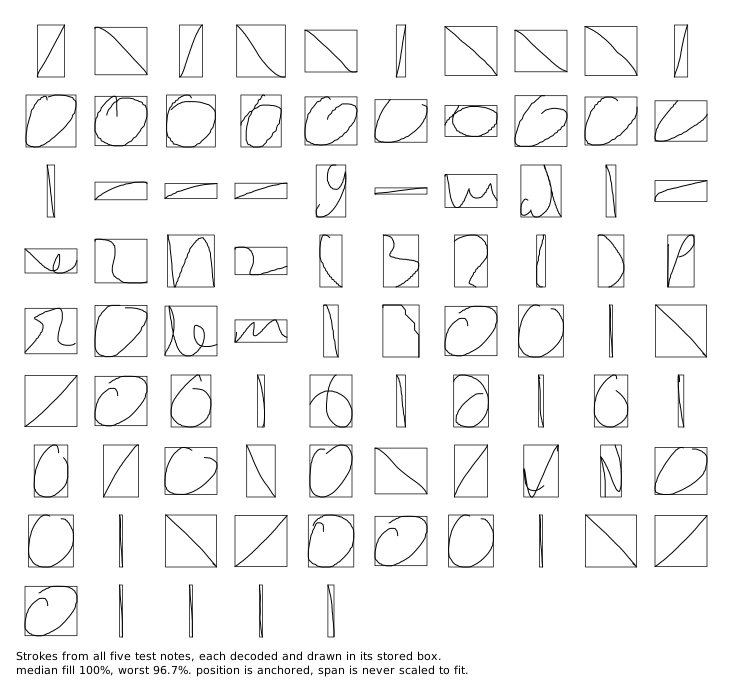
That gave me something to run on every change: decode, drop the strokes back in their boxes, see what broke. Most of the bugs I hit showed up exactly there, and the commit history is mostly that loop, find a stroke that doesn't fit, work out why, fix it, look again.
The clearest case was a whole note that decoded into garbage while the others came out clean. Every stroke in it sat wrong against its box. The records in that file carried a sixteen-byte run of zeros that the working files didn't, and those zeros pushed the point count and the start of the delta stream sixteen bytes past where my parser was reading, so it was decoding lengths and coordinates out of the middle of some other field. Keying the offsets off that padding, a check for the zero run, fixed every stroke in the file at once.
Across 86 strokes in five notes they fill their boxes to a median of 100%, worst 96.7%.
The worst fills are tiny strokes, where missing by a pixel is a big share of a small box. The one I keep looking at is the opposite, a tall stroke that still only reaches 99.4% (it's the one in the comparison further down). The box says it goes a few pixels lower than my decoded points do, and I'm not sure why. My best guess is the delta encoding is slightly lossy on that stroke's tail, since the five fractional bits only resolve to 1/32 of a pixel and there's a terminator on the end, so the points stop just short of the float positions the box was measured from.
Where the byte-pattern guess breaks
twangodev/sdocx reads those same words as sign-magnitude byte pairs, a magnitude byte and a sign byte. It's the read the file hands you. Its notebooks derive the format straight from the bytes, and if you line the delta stream up in a hex dump a pattern jumps out: each coordinate is one byte that varies, then a second byte that is almost always one of two values, all zeros or just the single top bit set. The word is little-endian, so that second byte is the high byte of the coordinate. For any step under eight pixels the whole integer part fits in the first byte, so the high byte is left holding nothing but the sign: all zeros when the step is positive, top bit set when it's negative. Handwriting is almost all sub-eight-pixel steps, so down the whole stream that byte really is just a sign bit. The decoder reads it that way: first byte as the magnitude, top bit of the second as the sign, and the rest of that byte as metadata to skip.
Those skipped bits are the top of the coordinate. The low byte alone holds five fractional bits and three integer, so it can only carry a step up to eight pixels. The moment one crosses that, the integer bits that spilled into the high byte get dropped and the value reads short: a 12-pixel step comes back as 4. Nothing in a page of handwriting forces that to happen often, so the model fits every byte in the sample and still misses a field that's there. That's the limit of working from the file alone: the bytes only exercise the parts of the format your samples happen to reach. Reading the encoder is what surfaces the rest.
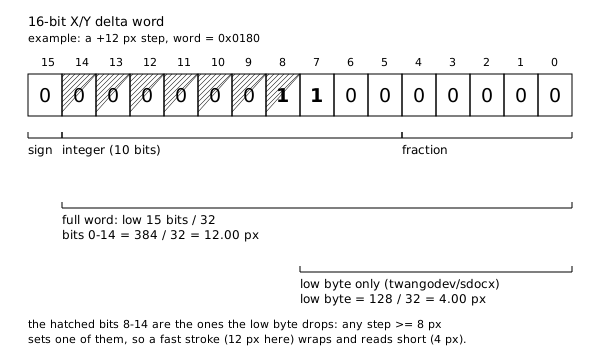
On a real stroke this shows up the moment the pen moves fast. The one below has a quick downstroke in it: seventeen of its samples cross 8 pixels, all of them get clipped, and the low-byte path ends up about a quarter short, stalling near the bottom of the box.
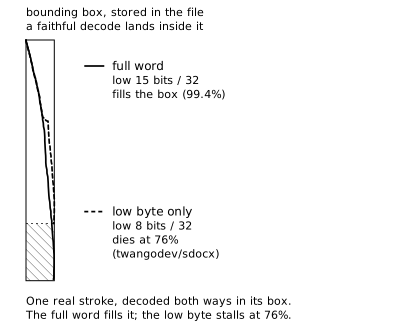
The bounding box that catches this is in the same file sdocx already reads. It parses the bounds out of every object and just never checks a stroke against them.
The same low-byte read runs on the rest of the stroke, too. Pressure and tilt are stored as the same kind of 16-bit fixed-point words, so keeping only the low byte distorts them the same way. It's just easy to miss, because those values stay small.
The other channels
A stroke isn't only geometry. The same records carry pressure, tilt, a timestamp, and per-stroke color and pen width. The per-point channels are stored exactly like the coordinates, 16-bit words with the same fixed-point split, so once I had the coordinate decode out of the native loop, pressure and tilt came with it. Color and pen width are plainer, literal values behind a marker near the end of the stroke; that marker was already worked out by twangodev/sdocx, so I used their layout there instead of re-deriving it. The renderer in the repo reads all of this and draws each stroke in its real color and thickness.
Why this sat private
I kept the repo private the whole time. Pulling apart Samsung's own libraries sits in a legal gray area, so the public version is my decoder and this write-up, not their binaries or decompiled source. The format is documented elsewhere now, so there's less reason to sit on it.
The decoder and the figure code are in samsung-notes-format.